-
LatestThe best Vacuum cleaner of 2026
-
 Bosch Flexxo Serie 4 BBH3ALL28 Handy cordless vacuum for quick everyday home cleanups
-
 Rowenta X-Clean 10 GZ7540 Cordless cleaner vacuums and washes hard floors simultaneously.
-
 Dreame Z40 Station Powerful cordless cleaning with convenient hands-free dust emptying.
-
 Dreame H15 Pro Cordless cleaner tackles spills and debris on floors
-
 Dreame H14 Pro Cordless wet-dry floor cleaning with hot-water self-cleaning
-
 Dreame Z20 Powerful cordless cleaning, versatile tools, and extended runtime
-
-
LatestThe best Vacuum cleaner of 2026
-
 Miele Guard L1 AllFloor Parquet Premium bagged canister vacuum for mixed flooring.
-
 Miele Guard S1 Compact bagged vacuum for dependable everyday home cleaning
-
 Rowenta Silence Force RO7740 Quiet, versatile bagged vacuum for everyday whole-home cleaning.
-
 AEG AB51C2SW 5000 Clean Practical bagged vacuum for everyday floors and carpets.
-
 Nilfisk One Allergy Compact bagged vacuum with HEPA 14 filtration for cleaner homes.
-
 Inventum ST306RZA Practical bagged vacuum for straightforward everyday home cleaning
-
-
LatestThe best Vacuum cleaner of 2026
-
 Philips 2000 Series FC8243/09 Lightweight bagged vacuum for simple everyday floor cleaning.
-
 Philips 2000 Series XB2125/09 Compact bagless vacuum for everyday hard-floor cleaning.
-
 Bosch BGC21POW1 Practical bagless cylinder vacuum for everyday mixed-floor cleaning
-
 Bosch BGC05AAA1 Serie 2 Compact bagless vacuum for everyday cleaning in small homes.
-
 AEG AL61C2OG Clean 6000 Practical bagless cylinder vacuum for everyday household floors.
-
 BOSCH BGC21HYG1 Series 4 Compact bagless vacuum with hygienic filtration for homes
-
-
LatestThe best Vacuum cleaner of 2026
-
 Shark Rotator Pet Pro LA555 Flexible corded upright for floors, stairs, and upholstery
-
 Shark ZU62 Navigator Zero-M Pet-friendly upright with tangle-resistant brushroll, spacious dust cup.
-
 Shark NV501 Rotator Professional Lift-Away Versatile upright with detachable pod and HEPA filtration
-
 Shark ZU561 Navigator Lift-Away Speed Versatile corded vacuum for floors, stairs, and pets.
-
 Shark ZU503AMZ Navigator Lift-Away Versatile corded upright tackles pet hair, carpets, and stairs.
-
-
LatestThe best Vacuum cleaner of 2026
-
 DeWALT D25303DH-XJ Tool-mounted extractor keeps masonry drilling cleaner and faster.
-
 DeWalt DXV20P Wet and Dry High-capacity vacuum for garage, workshop, spill cleanup.
-
 Makita VC4210L Large-capacity workshop vacuum with automatic filter cleaning.
-
 Nilfisk Multi II 30 T Powerful wet-and-dry workshop vacuum for DIY messes.
-
 Nilfisk Multi II 22 T Versatile wet-and-dry vacuum for home workshops and DIY.
-
 Nilfisk Buddy II 18 Compact wet-and-dry cleanup for home, garage, and DIY.
-
-
LatestThe best Robot vacuum cleaner of 2026
-
 Dreame Matrix 10 Ultra Premium robot vacuum with automatic room-specific mop swapping.
-
 Eufy Omni E25 Powerful robot vacuum with a self-cleaning roller mop.
-
 Philips HomeRun 5000 XU5100/10 Convenient mapped vacuuming, self-emptying, and light mopping.
-
 Eureka J15 Pro Powerful vacuuming, smart mopping, and hands-off dock care.
-
 Ecovacs Deebot T50 OMNI Slim, powerful cleaner with hands-off vacuuming and mopping.
-
 Ecovacs Deebot X8 PRO OMNI Premium vacuum-mop with self-rinsing roller and automated dock
-
-
LatestThe best Robot vacuum cleaner of 2026
-
 Blaupunkt Bluebot Xboost BPK-VCBB1XB Affordable robot vacuum-mop for everyday hard-floor upkeep.
-
 Shark AV911S EZ Self-emptying robot vacuum simplifies everyday floor maintenance.
-
 Shark AV753 ION Simple vacuum for everyday dust and pet hair.
-
 iRobot Roomba J7 Smart vacuum dodges clutter, cables, and pet messes.
-
 Eufy BoostIQ RoboVac 11S MAX Slim, affordable vacuum for everyday floor cleaning.
-
 Shark AI Ultra Scheduled, self-emptying floor care for everyday pet hair.
-
-
LatestThe best Hand vac of 2026
-
 BLACK+DECKER BHHV520JF-QW Cordless vacuum for quick home and car cleanups
-
 Philips MiniVac FC6148/01 Compact cleaner for quick crumbs and car touch-ups
-
 BLACK+DECKER DVA325JP07-QW Cordless vacuum for quick pet-hair and crumb cleanups
-
 Shark WV200 Wandvac Lightweight handheld vacuum for quick everyday messes.
-
 BLACK+DECKER PV1820L-QW Pivoting cordless hand vac for quick, awkward-spot cleanups.
-
 Rowenta X-Touch AC9736 Compact cordless vacuum for quick everyday messes.
-
-
LatestThe best Cleaner of 2026
-
 Kärcher SE 6 Signature Line Deep-cleans carpets and upholstery with versatile spray extraction.
-
 BLACK+DECKER 1500W Steam-mop Quick, detergent-free cleaning for compatible sealed hard floors.
-
 Shark StainStriker PX200EUT Portable spot cleaner tackles spills on carpets and upholstery.
-
 Kärcher SC 1 EasyFix Compact steam cleaner for quick, chemical-free home touch-ups.
-
 Kärcher SV7 Steam-clean and vacuum hard floors in one pass.
-
 Kärcher SC 3 EasyFix Plus Fast-heating steam cleaning for floors and household details.
-
-
LatestThe best Cleaner of 2026
-
 Nilfisk C 110.7-5 X-TRA Home Compact pressure washer for everyday outdoor cleaning tasks.
-
 Kärcher K7 Premium Power Control Heavy-duty washer for large patios and driveways
-
 Nilfisk Excellent 180-12 Car Powerful home washer for cars, patios, and grime
-
 Kärcher K3 Premium Power Control Compact washer for cars, furniture, and small patios.
-
 Kärcher K2 Power Control Compact, easy-to-use washer for cars, bikes, and patios
-
 Kärcher K5 Premium Power Control Versatile washer tackles patios, cars, and stubborn grime.
-
iRobot Roomba J7 review
Review the iRobot Roomba j7’s obstacle avoidance, pet-hair pickup, app mapping and battery life, plus its cleaning limits, upkeep and comparisons with rivals.
check best price


 2024-04-20
- By Sven Klinkerdam
Summary / TL;DR

The iRobot Roomba j7 is a vacuum-only robot designed for routine cleaning in homes with pets or everyday floor clutter. Its camera-based navigation can recognize and avoid common obstacles such as shoes and charging cables, while app maps support room-specific cleaning, schedules and no-go zones. It picks up dust, crumbs and loose pet hair effectively on hard floors and low- to medium-pile carpets, but may miss debris in deep carpet, corners or grout lines. Obstacle detection is not foolproof, and the standard model requires manual bin emptying and regular maintenance. With about 75 minutes of rated battery life and recharge-and-resume capability, it suits many homes, though larger spaces may need more time. It costs more than basic models and does not mop or include an automatic-emptying dock.
If you like this review, you might also like our review on the iRobot Roomba Combo 10 Max or iRobot Roomba Combo j5+ or iRobot Roomba Combo i8+.
Where to buy
 Best offers of the iRobot Roomba J7 at Amazon.com
Want to help us grow? When you purchase items through the above links we receive a small commission.
Introduction
The iRobot Roomba j7 is a premium robot vacuum designed for homes where some clutter is part of daily life. Its main appeal is simple: it uses a front-facing camera to spot common obstacles, including charging cables and pet waste, rather than expecting you to clear every inch of floor before a cleaning run. That can make a real difference in a living room where a phone charger has slipped beside the sofa or a dog toy is still on the rug.
It’s a vacuum-only model, so it won’t mop hard floors, and it costs more than basic robot vacuums that rely on bumping around to find their way. Still, the j7 makes a strong case for households that want scheduled, hands-off floor cleaning with fewer interruptions. For homes with pets, mixed flooring, or the usual scatter of everyday clutter, it’s a useful step up from a simple automated vacuum.
Related reviews
-

-

-
 Philips HomeRun 5000 XU5100/10Robot vacuum cleaners
What's in the Box
The box contains the essentials to get the robot vacuum running, plus a couple of small spares for routine upkeep. For the standard Roomba J7 package, expect:
- The Roomba J7 robot vacuum
- A Home Base charging station and power cord
- One extra high-efficiency filter
- One extra corner brush
- Printed setup and safety information
The spare filter and side brush are handy to have on hand: the brush reaches dust along skirting boards, while a replacement filter means you don’t have to wait for a washed filter to dry. The standard J7 box does not include the automatic dirt-disposal dock; that comes with the separate J7+ model. Box contents can vary by retailer or bundle, so check the listing if you’re buying a special package.
Design and Build Quality
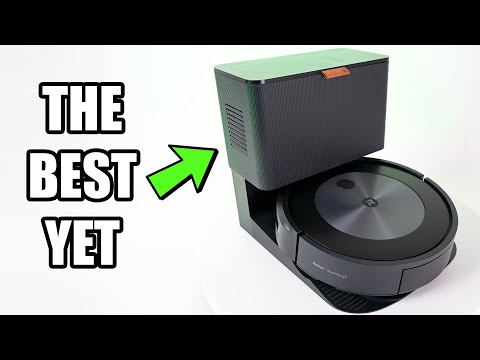
The Roomba j7 has a familiar round shape, but its front-facing camera gives the top panel a slightly different look from older Roomba models. The body measures about 13.3 inches across and 3.4 inches tall, so it can slip under many sofas and cabinets—though low clearance is worth measuring before you buy.
Practical, compact construction
The shell is sturdy plastic with a mostly matte black finish that doesn’t show everyday fingerprints too readily. The glossy camera area is less forgiving: dust and smudges show up on it, so an occasional wipe keeps the top looking tidy. A broad front bumper wraps around the nose to soften contact with chair legs and table edges.
Its circular footprint is easy to park beside a wall, and the included charging dock is relatively compact. The trade-off is that the j7 still needs some clear space around its dock; squeezing it tightly between a shoe rack and a cabinet can make that spot awkward to access for routine handling. Overall, the design feels made for everyday use, with a low profile and sensible finishes rather than flashy materials.
Setup and App Features
Getting the Roomba j7 connected is straightforward: install the iRobot Home app on your phone, create or sign in to an account, then follow the prompts to connect the robot to Wi-Fi. The app walks you through the setup, so you don’t need to hunt through a paper manual. If setup stalls, checking that your phone and robot are using the same home network is a sensible first fix.
Smart maps and room-by-room cleaning
The app’s most useful job is turning the floor plan into a practical cleaning map. After the robot has explored your home, you can name rooms, divide or merge areas, and set Keep Out Zones or Clean Zones around spots such as a tangle of charging cables or a water bowl. You can then ask it to clean just the kitchen or a particular room instead of sending it around the whole floor.
Once the map is set, save common jobs as Favorites—for example, a quick kitchen clean after dinner—and create schedules for regular runs. That combination makes room-by-room robot vacuum cleaning less fiddly than starting a full-house cycle each time. Map editing may take a little patience in an irregular home, especially if an open-plan living area needs to be split into more useful zones.
Useful controls, with a few limits
The iRobot Home app also shows cleaning history and lets you start, pause, or cancel a job remotely. The J7 can work with compatible Alexa, Google Assistant, and Siri voice controls, which is handy for simple commands like asking it to clean the kitchen. Some options depend on your phone, smart-home setup, or software version, so voice control may take a few extra steps to configure.
When the robot reports an obstacle, the app can show a photo and let you decide whether to mark that spot as an area to avoid. It’s a helpful way to refine future runs without changing the whole map. Overall, the Roomba J7 app features are easy to use once the first map is in place; the main drawback is that getting room names and boundaries just right can require a bit of hands-on editing.
Navigation and Obstacle Avoidance
The Roomba j7’s camera-based navigation helps it do more than bump around a room and change direction. Its PrecisionVision system looks for everyday obstacles such as charging cords, shoes and pet waste, then steers around them. That can save a lot of floor prep: a phone cable left beside the sofa is less likely to turn a scheduled clean into a rescue mission.
How its obstacle avoidance works
Rather than relying on LiDAR, the j7 uses a front-facing camera and visual mapping to track where it has been. It moves in orderly passes and builds a map you can edit in the app. Once rooms are mapped, you can name them and set Keep Out Zones around places such as a bowl stand or a tangle of desk cables.
When the robot spots something it isn’t sure about, it can take a photo and send it to the app. You can identify the object and help it make a better choice on later runs. This is useful for changing clutter—say, a backpack that’s usually beside the entryway but occasionally gets left in the hallway. It won’t make the vacuum infallible, though: thin cords, very small objects or items partly hidden under furniture may still catch it out.
Where it can struggle
The camera-based system needs a clear view of the floor. A low object tucked against a dark rug, or a cable that blends into the flooring, may be harder to spot than a shoe in open space. For best results, keep the floor reasonably visible and use app-defined no-go areas where obstacles are permanent. The j7’s pet waste avoidance is a welcome safeguard for pet owners, but it’s not a reason to leave accidents uncleaned: obstacle detection reduces the risk of a mess, rather than guaranteeing it will avoid every one.
Cleaning Performance
The Roomba j7 handles everyday messes well, especially crumbs, dust and pet hair on hard floors. Its two counter-rotating rubber brushes pull debris toward the suction inlet, while the edge-sweeping brush helps catch dirt along skirting boards. After breakfast, it can pick up the little scatter of cereal around a table; heavier bits may get nudged aside before the brushes collect them, so a second pass can help.
Hard floors, carpets and pet hair
On wood, tile and vinyl, it’s a capable robot vacuum for daily cleaning. Fine dust and crumbs generally disappear in a regular run, though debris lodged in deep grout lines or tight corners can be harder to reach. The cleaning head automatically adjusts to different floor surfaces, helping the rubber rollers stay in contact as the vacuum moves from hard flooring onto carpet.
Carpet pickup is strongest on low- and medium-pile rugs. It can lift surface dirt and loose pet hair, but it’s less thorough with grit pressed deep into thick carpet. The rubber rollers are easier to clear than bristle brushes, although long hair can still wind around them and needs occasional removal. For a busy home, that makes it a useful robot vacuum for pet hair, rather than a replacement for a full deep clean.
Dirt Detect technology can prompt extra attention when the vacuum senses a dirtier patch, such as crumbs beneath a kitchen chair. It’s handy for concentrated messes, but don’t expect it to remove every stubborn spill: this model vacuums only and has no mop function. Overall, it suits routine hard floor and carpet cleaning more than heavy-duty pickup in one pass.
Battery Life and Maintenance
The battery is rated for roughly 75 minutes of cleaning per charge, though carpet, higher suction demand and a larger floor plan can shorten a run. For a small apartment, that’s often enough for a full scheduled clean. In a larger home, the Roomba j7 can return to its dock, recharge and resume the job, so it doesn’t have to finish every room in one go.
Routine upkeep is straightforward, but the standard j7 does not empty its own dustbin. With pet hair or crumbs around the kitchen, you may need to empty the bin after each run; in a tidier home, it can go longer. The filter also needs regular attention. Tap dust out over a rubbish bin, but don’t wash it, since moisture can damage the filter.
Simple maintenance to keep it running well
- Empty the dustbin often, especially after cleaning up pet hair or fine debris.
- Clean the filter regularly and replace it when it’s worn or clogged.
- Remove hair from the rollers and check the side brush for strands wrapped around its base.
- Wipe the charging contacts with a clean, dry cloth if the robot has trouble docking or charging.
These quick checks take only a few minutes and help prevent small issues, such as hair-bound rollers or a dusty filter, from reducing cleaning performance. Replacement parts are available, and the battery can be replaced if its runtime drops noticeably over time.
Competitor comparison
Compared with other robot vacuums in its price range, the Roomba j7 stands out for its camera-based obstacle recognition rather than sheer feature count. That makes it a sensible pick for homes where charging cables, pet toys or the occasional dropped sock tend to end up in the vacuum’s path. Rivals may offer more automation for the money, though, especially if you want a self-emptying dock or mopping included.
| Model | Where it has an edge | Where the Roomba j7 makes more sense |
|---|---|---|
| Roborock Q5+ | LiDAR mapping builds room layouts efficiently, and the Plus version includes an auto-empty dock. | Its camera-based obstacle recognition is better suited to spotting small floor clutter, such as a cable beside a desk. LiDAR models can also have an advantage in very dark rooms. |
| Eufy L60 SES | It pairs laser mapping with a self-empty station, making it a strong value-focused choice for routine cleaning. | The j7 is the more appealing option if avoiding everyday obstacles matters more than getting a dock at a lower cost. |
| Roomba j7+ | It adds a Clean Base that empties the robot’s bin automatically. | It offers the same core vacuuming approach as the j7, so the main decision is whether you want the added dock convenience. |
The main trade-off is straightforward: some competitors give you LiDAR mapping and self-emptying for less, while the j7 puts more emphasis on recognizing objects that a basic mapping robot may bump into or push around. It also does not mop, so a Roborock model with a mop attachment may be a better fit if you want one robot for light vacuuming and damp floor maintenance. For pet owners or households with clutter-prone rooms, though, obstacle recognition can be more useful than a mop pad that only handles a quick pass over the floor.
Conclusion
The iRobot Roomba j7 is a strong choice for homes where a robot vacuum needs to handle more than open, uncluttered floors. Its obstacle avoidance can help it steer around things such as shoes, socks, and charging cables, while room-by-room cleaning makes everyday tidying easier to fit around a busy schedule. It’s especially appealing for pet owners who want a robot vacuum that can help reduce loose hair and crumbs between deeper cleans.
It isn’t a complete replacement for a full-size vacuum: corners and stubborn dirt may still need attention, and the standard j7 does not empty its own bin. But for routine floor care, its smart navigation and practical app features make it a capable, low-effort helper. Choose the Roomba j7 if avoiding common household obstacles matters more to you than getting the cheapest robot vacuum; consider the j7+ if automatic bin emptying is worth the extra cost.
Pros & cons
Pros
- Avoids common obstacles like cables
- Pet-waste detection reduces mess risk
- Room mapping, zones, and schedules
- Good routine cleaning on hard floors
- Recharges and resumes larger jobs
Cons
- Premium price
- No self-emptying dock included
- Vacuum-only; no mopping
- Struggles with deep dirt in thick carpet
Frequently Asked Questions
The iRobot Roomba j7 is a Wi-Fi connected robot vacuum designed to clean floors automatically while avoiding common obstacles. It uses PrecisionVision Navigation to recognize items like cords, socks, and pet waste, and it works on hard floors and carpets. The Roomba j7 also supports smart scheduling through the iRobot Home App.
Yes, the iRobot Roomba j7 is built to identify and avoid pet waste using PrecisionVision Navigation. It is one of the Roomba j7’s best-known features and is especially useful for pet owners who want more hands-off cleaning. This object detection also helps it avoid other everyday obstacles in your home.
A fully charged iRobot Roomba j7 battery lasts about 75 minutes. Actual runtime can vary depending on floor type, dirt level, and cleaning mode. If the battery runs low during a job, the Roomba j7 can return to its base to recharge and then resume cleaning.
Yes, the iRobot Roomba j7 uses Imprint Smart Mapping to learn your floorplan as it cleans. After mapping, it remembers the layout and can clean specific rooms or areas on command. This makes the Roomba j7 more efficient and easier to customize through the app.
Yes, the iRobot Roomba j7 can clean specific rooms, specific areas, or an entire level of your home. Once it has created a smart map, you can choose exactly where it should clean from the iRobot Home App. This is helpful for targeted messes and room-by-room cleaning.
Yes, the iRobot Roomba j7 works with voice assistants like Alexa and Google Assistant. You can use voice commands to start cleaning and, in supported setups, direct it to clean certain rooms or areas. This adds convenience for everyday cleaning control.
Yes, the iRobot Roomba j7 includes recharge and resume functionality. When the battery gets low, it can go back to its charging base automatically. After recharging, it returns to finish the cleaning job where it left off.
The iRobot Roomba j7 uses a 3-stage cleaning system with 10x the power-lifting suction compared with the Roomba 600 series. It is designed to pull in dirt, debris, and pet hair from carpets and hard floors. Dual Multi-Surface Rubber Brushes help it adapt to different floor types and reduce hair tangles.
The iRobot Roomba j7 is designed with cliff-detect sensors to help it avoid stairs and other drop-offs. These sensors tell the robot when it is near a ledge so it can change direction. This makes it safer to use in multi-level homes.
No, the iRobot Roomba j7 does not require a Clean Base. The Clean Base Automatic Dirt Disposal is sold separately for the j7, and it is the feature that makes the j7+ self-emptying model. Without it, the Roomba j7 uses a removable bin that can be emptied manually.
Important
Before buying any product, check all details of this product on the website or in the store where you purchase it. Aspects and specifications mentioned in the text above might differ.

Written by Sven Klinkerdam
Sven Klinkerdam is a distinguished review writer with over a decade of experience specializing in vacuum cleaner technology. He has established himself as an authority in the field of home appliance reviews, particularly focusing on stick, robot, and shop vacuum cleaners. Known for his thorough and unbiased evaluations, Sven's reviews are a trusted resource for consumers seeking to make informed purchasing decisions.
With a background in electronics and home gadgets, Sven's expertise is rooted in practical experience gained while working at Dixons and in product development. His reviews are characterized by a deep understanding of consumer needs, rigorous product testing, and clear communication of technical details. Outside of his professional pursuits, Sven enjoys outdoor activities like fishing and boating, which provide a refreshing balance to his work and inspire his engaging writing style.
Read more about SvenWhere to buy
More iRobot reviews
Videos
-

-

-
 irobot roomba j7 unboxingbeth frank @farbav
-

-
 iRobot Roomba j7 Robot Vacuum UNBOXING & HOW to SETUPJust A Dad Approved
-